
Introduction: "How is this country's economy doing right now?"
If your work involves other countries, these situations probably sound familiar.
- "We want to choose a country for a new factory or office from a few candidates."
- "I'm thinking about investing abroad and want to see how prices and interest rates are moving there."
- "I want to check how the minimum wage and exchange rate are changing in our partner's country."
- "I saw a number in the news, but I'm not sure it's the latest official figure."
When you look at a country's economy, two things matter most: who published the number and when it is from. Figures on summary sites or in old articles may already be out of date.

Six things to look at first in a country's economy
1. GDP (gross domestic product) and growth rate
GDP is the total value of goods and services a country produces in a year. The growth rate tells you whether the economy is growing fast or slowly.
2. Inflation rate
This shows how fast prices are rising. In countries with high inflation, the cost of supplies and wages can change quickly.
3. Policy rate
The interest rate set by the country's central bank. It is the benchmark for borrowing money, so it matters when you borrow to grow a business or when you consider investing.
4. Exchange rate
The rate at which that country's currency trades against your own. When the exchange rate moves a lot, your sales and purchase amounts change too.
5. Employment and minimum wage
How the job market is doing, and the minimum wage set by law. It gives you a rough idea of labor costs when you open a factory or a shop.
6. Sovereign credit rating
A rating agency's view of how likely a country is to repay its debts. It is a guide to the country's overall creditworthiness.
Other useful clues when choosing a country include stock indexes, IPOs, political risk, sanctions, capital controls and environmental regulations.
The hard part: collecting and comparing official, up-to-date figures
- Language barrier — central banks and statistics offices often publish in the country's own language
- Time spent searching — you need to visit different websites for each indicator and each country
- Keeping up to date — figures change every month or year, and it is hard to tell which release is the latest
Compare official sources only, in your native language, with Factdock Finance & Investment
With Factdock Finance & Investment, you just pick the countries and the indicators. The tool searches official sources only, such as central banks, statistics offices and stock exchanges, in each country's own language, and shows the results in your native language.
This tool helps you research countries' economies. It is not investment advice. Before any decision to invest or expand, always check the original sources and talk to a professional.
1. Pick up to 3 countries and the indicators you need
Choose 1 to 3 countries, then indicators such as GDP, inflation, policy rate and exchange rate. You can also narrow the time period.
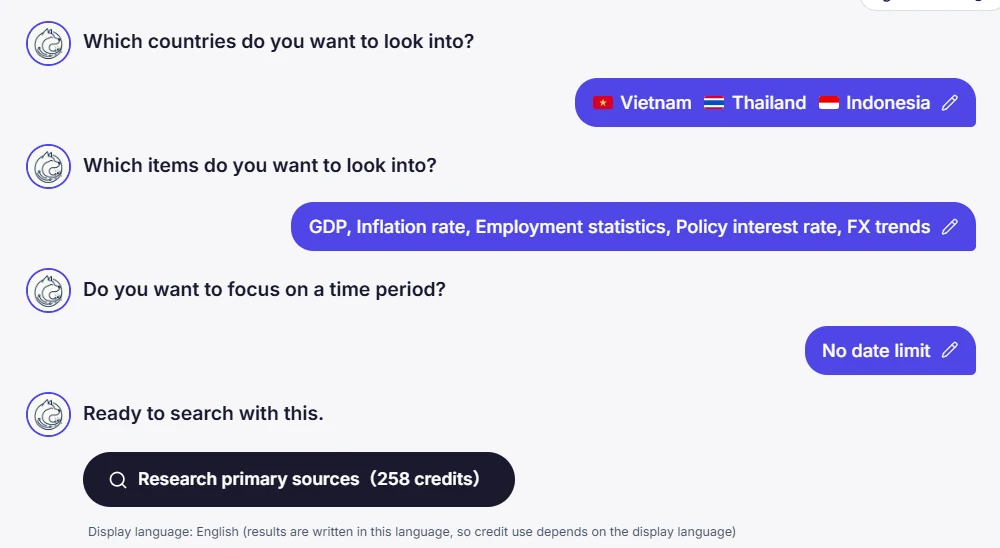
2. Search official sources only, in each country's own language
The tool searches official sources only: governments, central banks, statistics offices, stock exchanges, international organizations and rating agencies. It uses the official terms in each country's own language, so it can reach local announcements too.
3. Compare countries in a table with sources
If you choose two or more countries, the figures for each indicator appear in a comparison table. Every figure comes with its source and date. If no official figure is found, the cell stays blank. We never fill it with a guess.
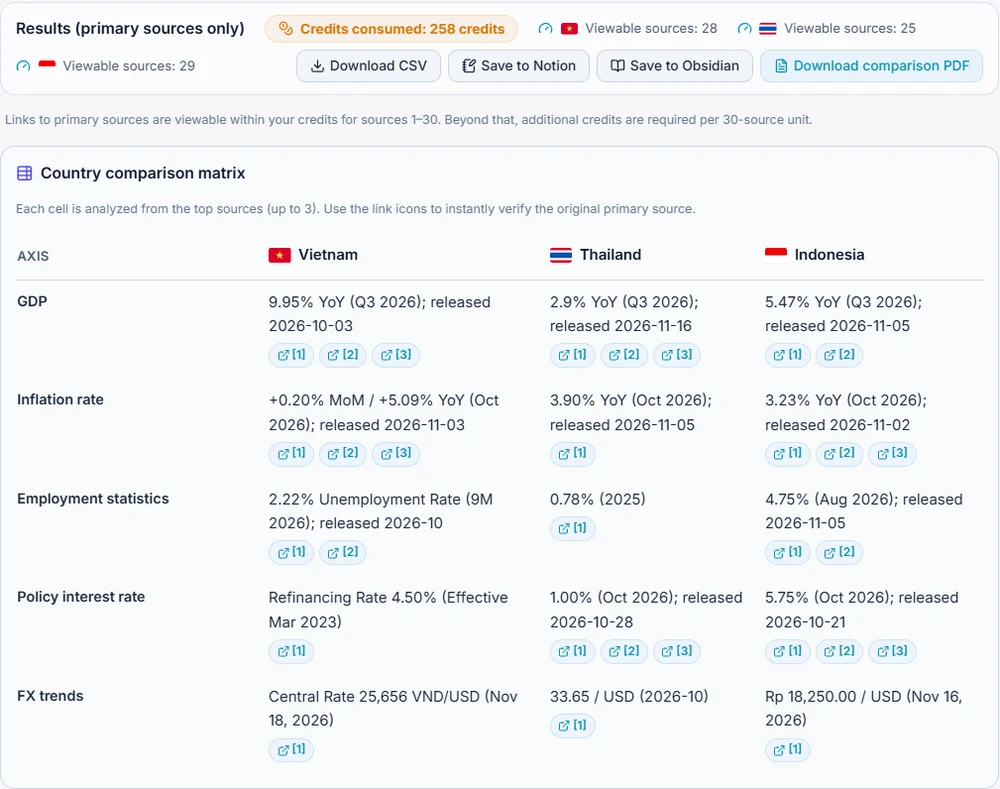
4. Dig deeper into one country
You can also pick one country and search for more official information. The documents found are listed with their titles and short summaries in your native language, so you can get the gist before opening the original.
Once you have chosen a country, you can also check your future business partners using the method in our article on how to check an overseas company.
Who this is for
- Companies planning to expand abroad — when you want to compare countries for a factory or office using official figures
- People thinking about investing — when you want to check a country's prices, interest rates and exchange rates in your own language
- International sales and purchasing teams — when you want to keep track of minimum wages and exchange rates in your partners' countries
- Anyone who wants to research in their own language — both your input and the results are in your native language
Pricing
You can start from $3. Feel free to give it a try. Full details are on our pricing page.
Final thoughts
Big decisions abroad start with the right numbers. Who published it, and when? If you check this as you compare countries, your decisions will rest on solid ground.
Next time you wonder how a country's economy is doing, start by checking the official figures in your native language.
* The information shown is reference material gathered and organized from official sources. It is not investment advice. Before important decisions, always check the original sources and consult a professional.
What it is
Factdock in 2 minutes 30 seconds
The video is in English. You can choose subtitles in your language from the player settings.
Frequently asked questions
Does it give investment advice?
No. Factdock only finds official information and shows it with its sources. It does not tell you which country to invest in. For important decisions, always consult a professional.
What sources does it use?
Official sources only: governments, central banks, statistics offices, stock exchanges, international organizations and rating agencies. It does not use figures from summary sites or blogs.
How many countries can I compare?
Up to 3 countries at a time. If you choose two or more, a comparison table by indicator is shown.
Can I use it in English?
Yes. Both your input and the results are shown in English. You can also use it the same way in 109 languages, including your native language.
How much does it cost?
You can start from just $3. For full details, see our pricing page.
Our own patent-pending search engine
Countries' economies, in official figures. In your own language.
Just pick the countries and indicators. Compare official information from central banks, statistics offices and more, with sources, in your native language.