
Introduction: "I want to cite this paper later"
Does this sound familiar when you are working on research or a report?
- "I found a paper in a foreign language, but collecting its citation details takes time."
- "I type author names, journal titles and years by hand, one by one."
- "I want to keep the papers I find in the reference manager I always use."
- "Later, I can't remember where I found a paper."
When you write a paper, it is important to record which papers you used accurately. Copying citation details by hand also makes typing mistakes more likely.

What are BibTeX and RIS?
Both are standard formats for bundling a paper's citation details (authors, title, journal, year and more) so that one program can pass them to another. Most reference managers can read one or both of them.
1. BibTeX (.bib)
A common format used with a typesetting system for writing papers. It is popular with people who write papers in the sciences.
2. RIS (.ris)
A widely used format that most reference managers can read. If you are not sure which one to use, choose the format your software can import.
Export citation details of the papers you find with Factdock
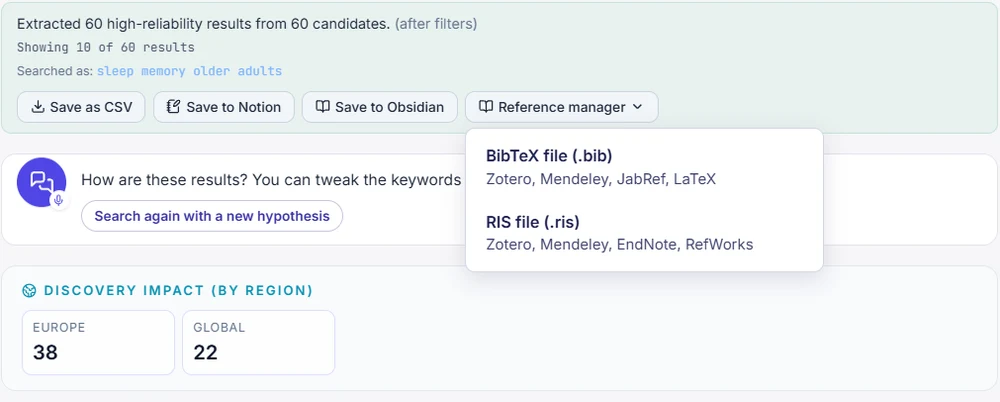
In Factdock's Academic Papers search, you can export citation details in BibTeX or RIS format with the "Reference manager" button on the results screen.
1. Search for papers in your own language
Type what you want to know in your own language, and Factdock searches papers from around the world in databases such as PubMed and arXiv. The results show titles and summaries in your language.
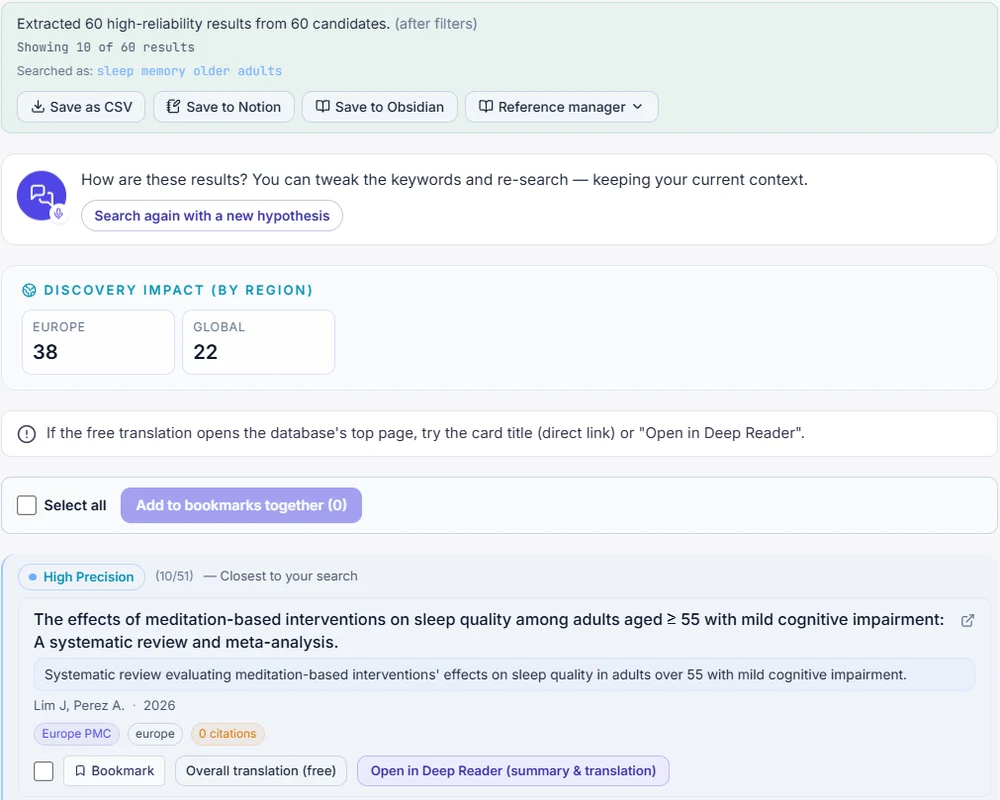
2. Choose a format from "Reference manager"
Press the button and choose BibTeX or RIS, and the file is saved on your computer. Then simply open that file in your reference manager.
3. Titles stay in the original language, translations go in the note
The title used for citation is exported in the paper's original language. The title and summary translated into your language go into the note field, which helps you remember the content later.
The export runs only on your own device. It uses no credits. You can also save papers you like in Bookmarks and export them from there.
To learn how to find papers, see how to search papers in your language. To learn how to read papers in other languages, see how to read papers in a foreign language.
Who this is for
- Graduate students and researchers — when you want to build a reference list quickly and accurately
- Doctors, dentists, veterinarians and pharmacists — when you want to keep the papers you read in a form you can check again later
- Students writing reports — when you want to record foreign-language papers properly as references
- Anyone who wants to research in their own words — search and read in your own language
Pricing
Exporting citation details is free. Paper search is available from $3. Feel free to give it a try. You can find full details on the pricing page.
Conclusion
Even if you find a great paper, others cannot trace it unless the citation details are accurate. If you export them right when you find the paper, building your reference list becomes much easier.
When you think "I want to cite this paper later," export it first and keep it in your usual reference manager.
Note: Exported citation details are based on the information in the paper databases. Before you submit your work, always check the author names, title, year and other details against the original paper.
What it is
Academic Papers
Searches more than 15 academic databases at once for papers in fields other than medicine, such as economics, engineering, law and the environment. Builds one list without duplicates that you can read in your own language. Medical and veterinary papers can be searched in Medical & veterinary literature.
Deep Reader & Fact-Check
Paste a URL, and read any foreign article, paper or PDF in your own language. Beyond a summary and term explanations, it checks — with sources — whether newer information has appeared since it was published.
Factdock in 2 minutes 30 seconds
The video is in English. You can choose subtitles in your language from the player settings.
Frequently asked questions
Does exporting use credits?
No. Exporting citation details is a free feature that runs only on your own device. Credits are used only for paper searches and for translations you press yourself.
Which reference managers does it work with?
It works with any reference manager that can import BibTeX (.bib) or RIS (.ris) files. Choose the format your software can read.
Are titles translated?
The title used for citation is exported in the paper's original language. The title and summary translated into your language go into the note field.
Can I use it in English?
Yes. Both your input and the results are shown in English. Besides English, you can use it the same way in 109 languages, including your native language.
How much does it cost?
Exporting is free. Paper search is available from $3. For full details, see the pricing page.
Our own patent-pending search engine
Find papers from around the world in your language, and send them straight to your reference list.
Just search and press a button. Export the citation details of the papers you find in BibTeX or RIS.