
Introduction: "I found the paper. Now I have to read it."
When you look into research, these moments are common.
- "I finally found the right paper. But it's in a foreign language, and reading all of it takes time."
- "Looking up every technical term, one by one, is hard work."
- "This paper is five years old. I don't know if it still holds today."
- "I want to read a PDF report from an overseas authority accurately, in my own words."
We covered how to find papers in our article on Academic Papers search. This article is about the next step: reading the paper you found in your own language, and checking it.

5 basics for reading foreign-language papers
1. Read the abstract first
At the start of a paper there is an abstract, a short summary of the content. Read it before the full text. It tells you whether the paper is the one you need.
2. Check the publication date
Research moves forward every year. The conclusion of a paper from a few years ago may have changed with later research. First, check when the paper was published.
3. Understand technical terms first
If you get a technical term wrong, the meaning of the whole sentence can change. When a word is unclear, check its meaning in a reliable source.
4. Separate "what we know" from "what we don't know yet"
Many papers describe their limitations after the results: what this study cannot tell us. Reading this part shows how far you can trust the results.
5. Look for free versions
Some papers are free for anyone to read (open access), and some are paid. Check whether a free version has been published.
What matters is reading the original paper correctly, together with the latest information. But reading a long paper in a foreign language, and then searching for later research, takes a lot of work.
The hard part: reading it, then checking what came after
- The language barrier — the paper is in a foreign language, with many technical terms
- The volume barrier — there is no time to read every page of a long paper
- The time barrier — finding new research and announcements published later is hard to do on your own
Read and check in your own language with Factdock's Deep Reader & Fact-Check
Factdock's Deep Reader & Fact-Check lets you read the full text in your own language. Just enter the URL of a paper or web page, or a PDF. It also checks, with sources, whether new information has come out since publication.
Note: the screenshots in this article are from a real test run on an actual paper. To keep the paper from being identified, the title and parts of the content are blurred.
1. Just enter a URL or PDF
Enter the URL of the paper or web page you want to read, or a PDF. That's all. You can also open a paper directly from the ones you found with Academic Papers.
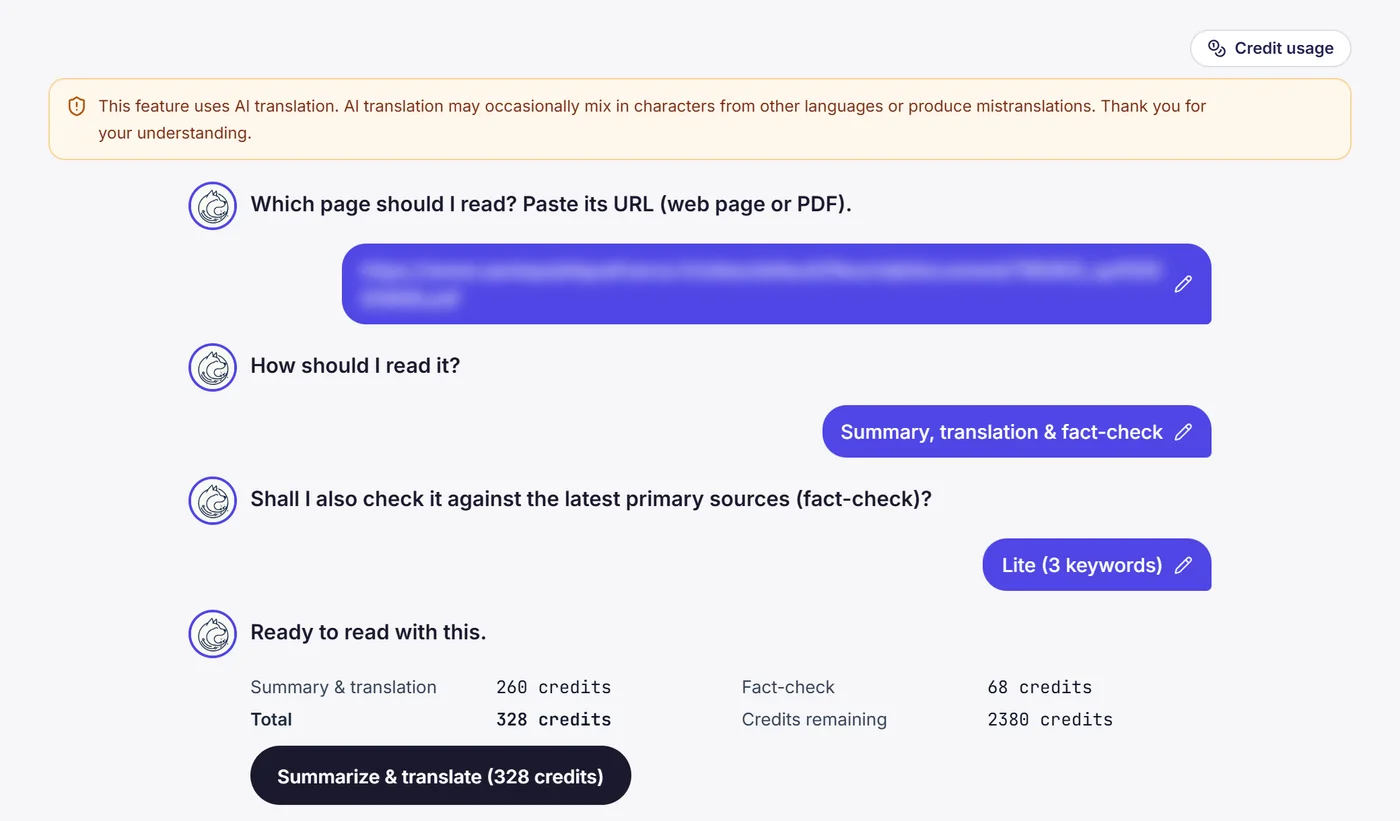
2. Full translation, summary and term notes
The full text is translated into natural text in your own language, and the key points are summarized. Technical terms in the text come with explanations and sources. If you only need a translation, you can choose translation-only mode.
3. Check for new information after publication
It searches for papers, announcements from public bodies, and web articles published after the document's date. It shows points that are now out of date and things that have been newly found. You can choose "Light" with 3 keywords or "Deep" with 5.
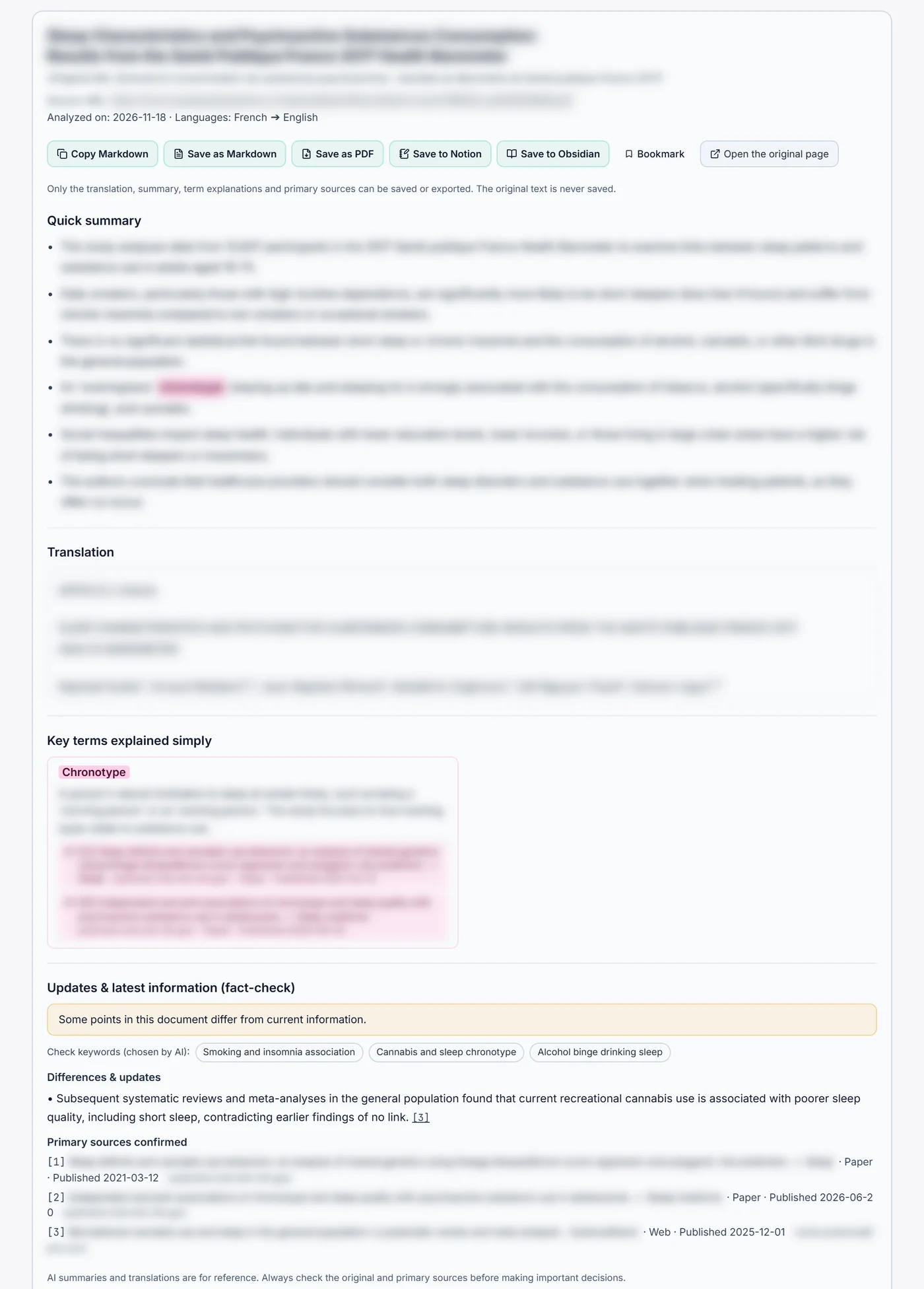
4. No source, no result
The check shows only items whose source URL and publication date could be confirmed. The document you are reading is left out of the check, so it never "compares itself with itself" and reports no difference.
This tool helps you read and check documents. It does not replace medical or research judgement. Always base important decisions on the original source and the advice of experts.
Who this is for
- University and graduate students — when you need to understand foreign-language papers quickly for reports or research
- Researchers — when you want to check whether a paper from a few years ago still holds
- Doctors, dentists, veterinarians and pharmacists — when you want to read overseas papers and authority reports accurately in your own language
- Anyone who wants to read in their own words — input and results, all in your own language
Pricing
You can start from $3. Feel free to give it a try. You can find full details on our pricing page.
Conclusion
Finding a paper is only the beginning. Read it in your own language and check the research that came after. Then you can use it with confidence.
If you ever wonder, "Is this paper still right?", start by reading it and checking it in your own language.
What it is
Deep Reader & Fact-Check
Paste a URL, and read any foreign article, paper or PDF in your own language. Beyond a summary and term explanations, it checks — with sources — whether newer information has appeared since it was published.
Academic Papers
Queries more than 15 academic databases worldwide at once and builds a de-duplicated reference list automatically. It maps the gap between global consensus and findings reported only in specific regions, so you can read it clearly in your own language.
Factdock in 2 minutes 30 seconds
The video is in English. You can choose subtitles in your language from the player settings.
Frequently asked questions
What kinds of documents can I read?
You can read public web pages and PDFs. Besides papers, it works for reports from public bodies and news articles. Paid articles and members-only articles cannot be read.
What does the check look for?
It searches for papers, announcements from public bodies and web articles published after the document's date. It shows points that are now out of date and things that have been newly found. Only items whose source URL and publication date could be confirmed are shown.
Is the document I read stored on your servers?
No. Factdock does not store the text of the document on its servers. You can save or export the results, such as the translation and summary, yourself.
Can I use it in English?
Yes. Input and results are shown in English. Besides English, you can use it the same way in 109 languages, including your native language.
How much does it cost?
You can start from just $3. For full details, please see our pricing page.
Our own patent-pending search engine
Foreign-language papers, in your own language. Checked against the latest information.
Just enter a URL or PDF. Get a full translation and summary, and check newer information since publication, with sources, in your own language.