
Introduction: the slowest part of searching for papers
Have you ever used an English-language paper database for a thesis or for background research?
Even harder than reading English is turning your search words into English technical terms.
- "Gut bacteria": gut microbiota? intestinal flora? Or microbiome?
- "Bedsores": bedsore? pressure ulcer? pressure injury?
- "Solid-state batteries": all-solid-state battery? solid-state battery?
PubMed and most other paper databases are built for searching in English. You cannot ask your question in your own language. So first you translate what you want to know into English in your head, and then you have to find the right technical term used in that field. The word in the dictionary is not always the word used in papers.

One choice of word can completely change which papers come up. You search again and again, and when you finally find an English abstract, you read it with the dictionary open once more. For researchers and students whose first language is not English, this happens almost every day.
A search that takes a native English speaker one try can take many times longer. That gap comes not from the research itself, but from language.
Factdock's Academic Search: 4 steps
The screenshots in this article are shown in Spanish, German, French and Chinese (Traditional). Factdock works the same way in every language.
1. Write what you want to know, in your own language
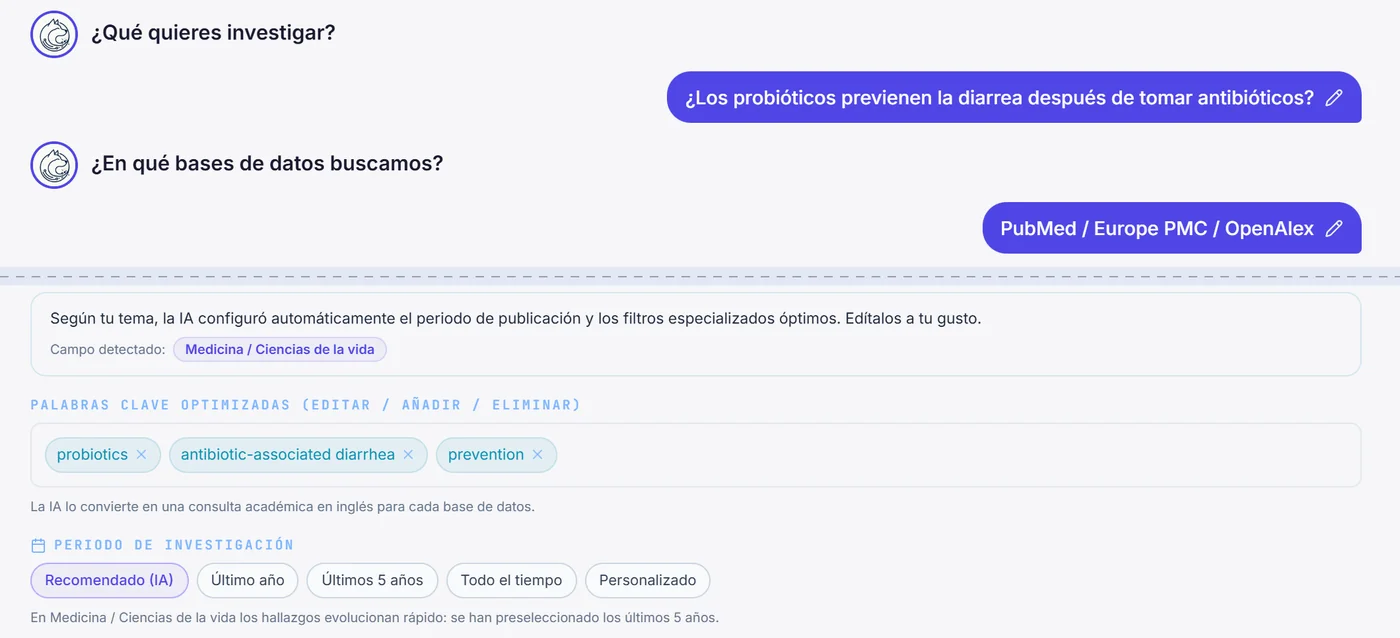
Just write in everyday words, for example: "I want to know whether probiotics help with diarrhoea after taking antibiotics." Factdock supports 109 languages. You can also start a search by taking a photo of a figure or graph from a paper.
2. Factdock builds the English technical terms
From what you wrote, Factdock builds English academic terms suited to each database. The keywords are shown before the search, so you can review, add and remove them. Words you want to exclude can be typed in your own language, too.
After the search, the "terms actually searched" are shown as well. "So that's what this field calls it": it is also a handy way to learn the English terms.
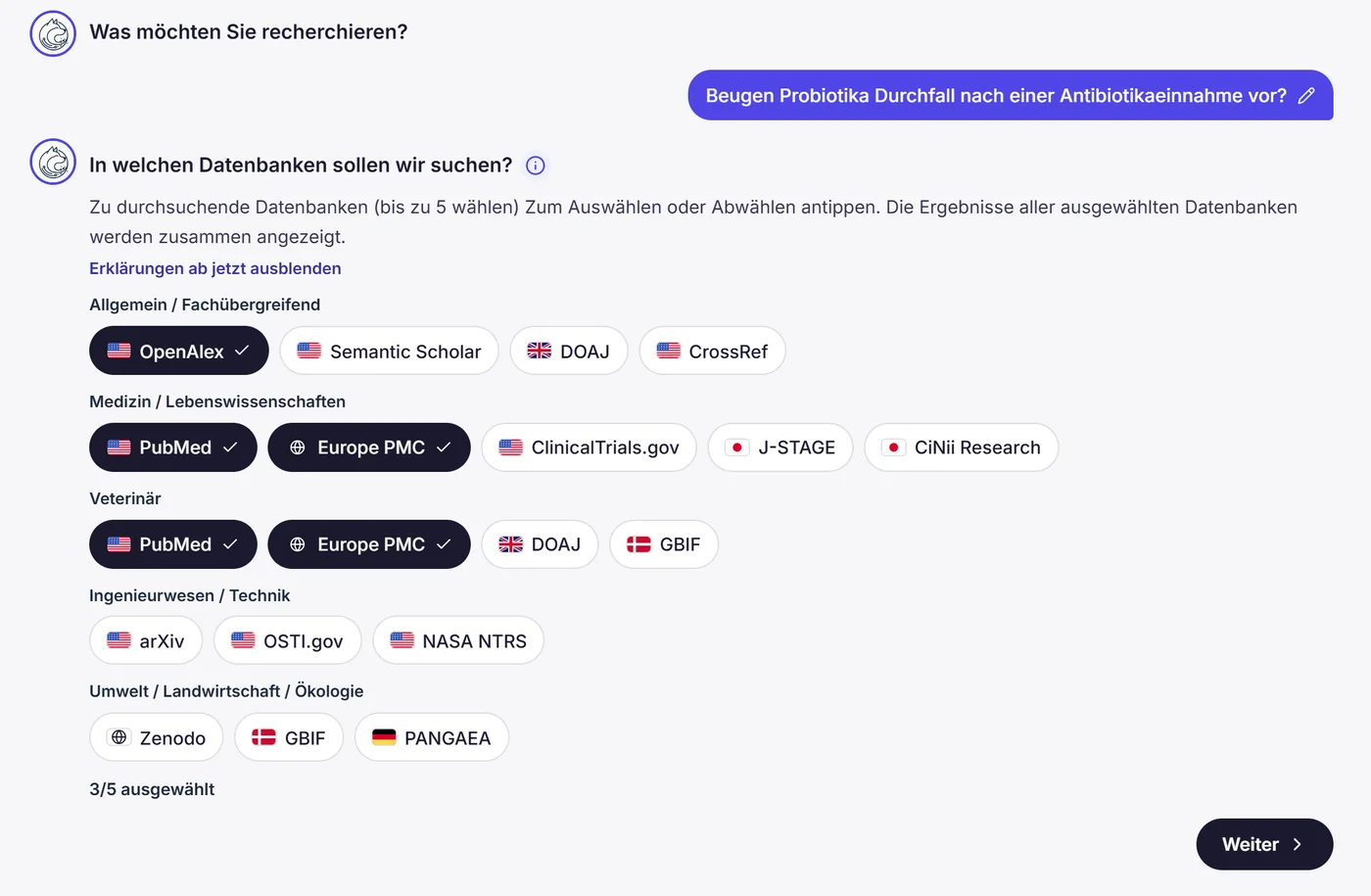
3. Search your chosen databases at once, with results in your language
You can choose up to 5 databases per search. They are searched at the same time, and duplicates of the same paper are merged into one.
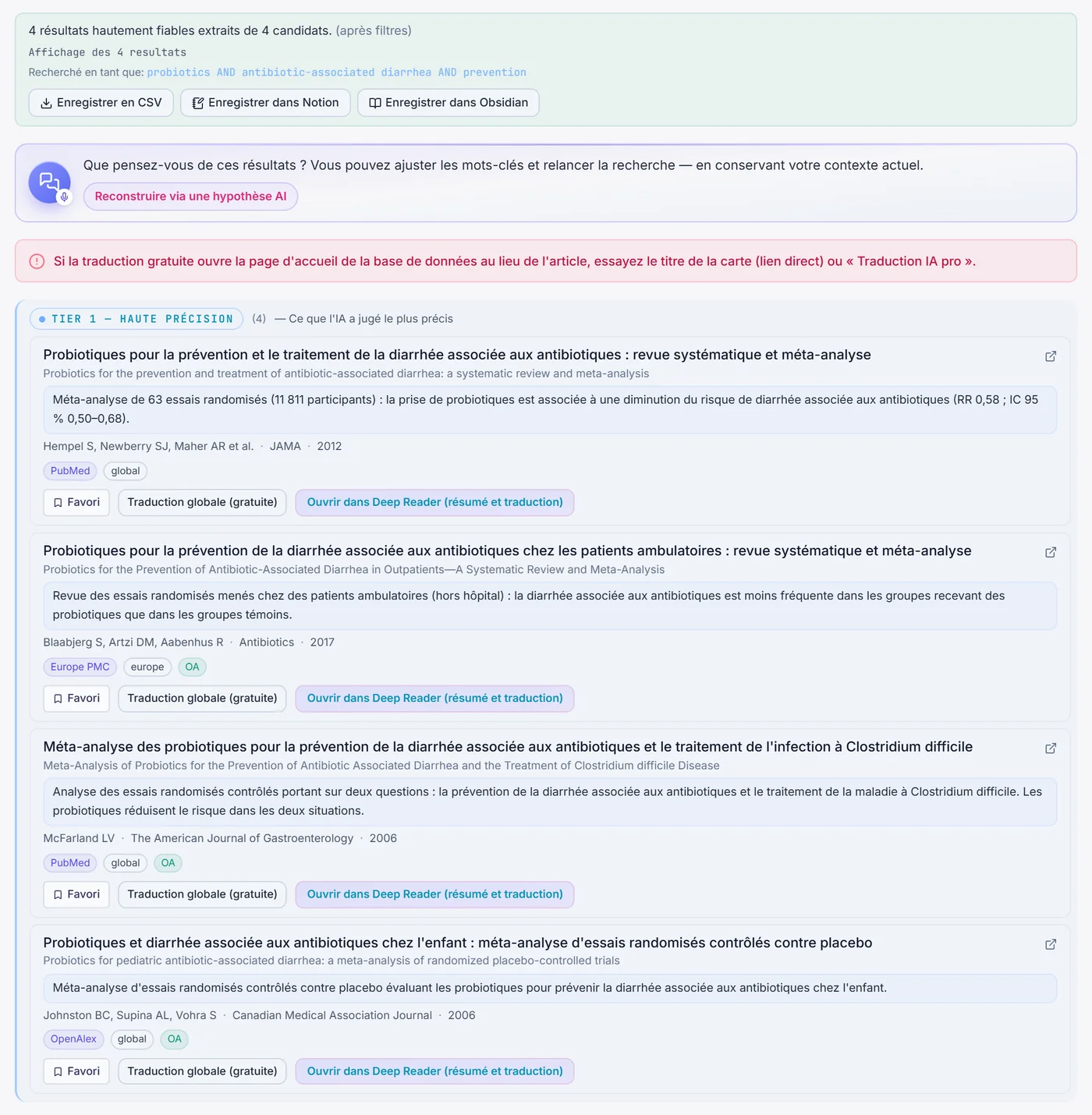
For the first 10 results, titles and abstracts are translated into your language. The original English title is shown alongside, so you can cite correctly when you write. From the DOI link you can go straight to the publisher's page, or to the full text if an open-access version exists.
Start by looking carefully at those 10. When you want to read more, you can see further results 10 more at a time.
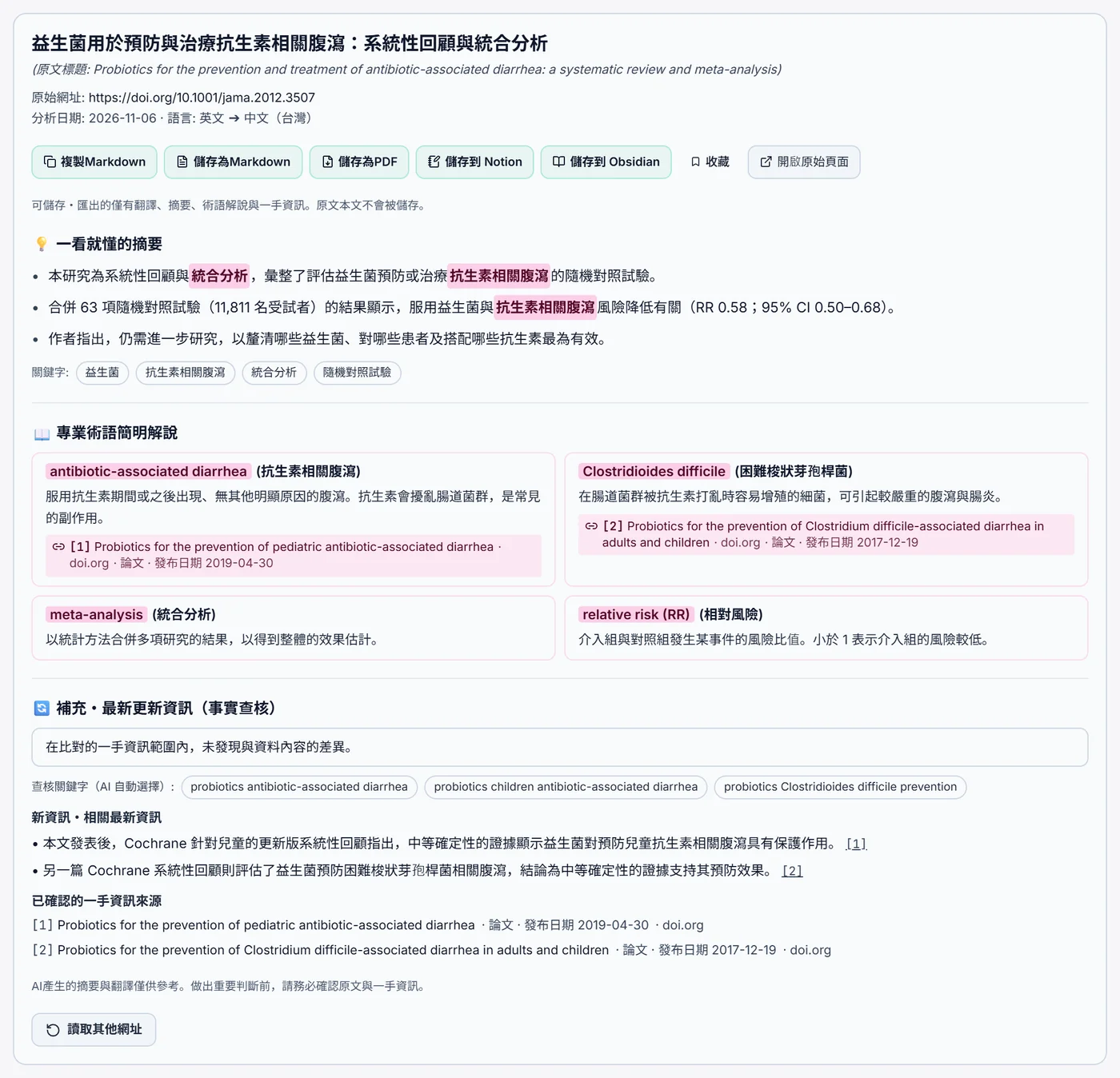
4. Go deeper into the papers that catch your eye, with Deep Reader
From a result card, you can open the paper straight in Deep Reader. Your search results stay on the original screen, so you can read as many papers in a row as you like.
- The full text in your language — the paper's web page or PDF is translated into natural text in your language, all the way through
- Summary and explanations of technical terms — the key points in short, with sourced explanations of technical terms
- Does the paper still hold up? — it searches papers, announcements from public bodies and web articles published after the paper, and checks them for new findings or changes
- Source and publication date, always shown — only results whose source URL and publication date could be confirmed are shown
Even checks like "This paper is 10 years old. Has the conclusion changed since?" can be done in your own language.
The 15 academic databases you can search
Choose from these 15 databases, grouped by field.
Medicine & life sciences
- PubMed — the medicine and life sciences literature database from the US National Library of Medicine (NLM). The first place to look for medical research
- Europe PMC — Europe's life sciences literature database, with many full-text papers and preprints
- ClinicalTrials.gov — a registry of clinical trials worldwide, including trials still in progress
- J-STAGE — the platform that publishes Japanese academic society journals and papers online
- CiNii Research — a search service for Japanese papers, research data and research projects in one place
Across fields
- OpenAlex — one of the world's largest free and open databases of scholarly literature
- Semantic Scholar — an academic search engine for researchers, covering a wide range of papers across all fields
- CrossRef — the database of the international organisation that registers DOIs for papers. Find information on papers registered by publishers
- DOAJ — a directory of peer-reviewed open-access journals. Useful when you want papers you can read for free
Science & technology
- arXiv — a server for preprints (papers before peer review) in physics, mathematics, computer science and more
- OSTI.gov — research results and technical reports from the US Department of Energy
- NASA NTRS — NASA's technical reports and research papers
Environment & data
- Zenodo — an open repository for papers and research data, run by CERN (the European Organization for Nuclear Research)
- GBIF — an international network that connects biodiversity data from around the world
- PANGAEA — a German data library that publishes research data from earth and environmental sciences
For veterinary and animal science, you can also use the "Veterinary & animal science" group, which selects PubMed, Europe PMC, DOAJ and GBIF together.
Not sure which to pick? Start from your goal. For medicine, PubMed and Europe PMC. To favour papers you can read for free, DOAJ. To catch new research as early as possible, arXiv or the preprints in Europe PMC.
What it means for researchers and students whose first language is not English
- No more translating technical terms into English — you can review and fix the keywords, so the search stays on target
- Read abstracts in your own language to choose what to read — narrow things down before reading everything in English
- Shown alongside the original English title — ready for citing and for sharing with your supervisor or co-researchers
- Learn the English terms as you go — the "terms actually searched" show how your field says it
- Read the papers that matter in full, in your language — with Deep Reader, check the full translation and even newer information published since
Who we built this for
- Undergraduate and graduate students — for finding prior research for a bachelor's, master's or doctoral thesis
- Researchers — when you want a quick overview of what is happening outside your own field
- Doctors, dentists, vets, nurses, pharmacists and everyone in healthcare — when you want to check a clinical question against recent literature
- Corporate R&D and IP teams — for groundwork on a new topic or for following technology trends
- Anyone who prefers to search in a language other than English — input and results, all in your own language
Pricing
Plans start from $9 per month. Feel free to give it a try. You can find full details on the pricing page.
In closing
Most of the world's research is published in English. Yet many of the people who search for it and read it do not speak English as their first language.
Don't let an important paper slip past just because you didn't know the English term. Start by writing what you want to know in your own language.
* Translations are there to help you grasp the content. Before citing or making important decisions, always check the original text.
Frequently asked questions
Can I search PubMed in my own language?
Yes. Write what you want to know in English or in any of 109 languages, and Factdock builds the English academic terms for PubMed and runs the search. For the first 10 results, titles and abstracts are translated into your language. You can see further results 10 more at a time. You can search the same way in 109 languages.
Can I use it without knowing English search syntax or technical terms?
Yes. Factdock builds the English keywords, and you can review, add or remove them before the search. After the search, the terms actually searched are shown as well.
Which databases can I search?
You can choose up to 5 at a time from 15 databases and search them together: PubMed, Europe PMC, ClinicalTrials.gov, J-STAGE, CiNii Research, OpenAlex, Semantic Scholar, CrossRef, DOAJ, arXiv, OSTI.gov, NASA NTRS, Zenodo, GBIF and PANGAEA.
Can I read the papers I find in full? Can I compare them with newer research?
Open a paper in Deep Reader from its result card, and the paper's web page or PDF is translated into your language in full, with a summary and explanations of technical terms. It also searches papers and announcements from public bodies published after the paper, and checks for new findings, with sources and publication dates.
Can I search only for papers I can read for free?
Yes, you can narrow the search to "Open access only". Choosing DOAJ, a directory of open-access journals, is also a good option.
How much does it cost?
Plans start from $9 per month, so it is easy to get started. For full details, see the pricing page.
Try searching PubMed and arXiv in your own language.
Search 15 academic databases at once, in your own language. Factdock builds the English technical terms for you.