
Introduction: when you want a source behind the AI's answer
AI assistants are very handy for drafting text, summarizing and brainstorming. But when you use them for research, you may run into situations like these.
- The answer sounds plausible, but you can't tell where it was written
- You asked about a rule in another country, and your own country's rules or outdated information got mixed in
- You want to check the original announcement from that country's agency or regulator
- You want to read documents in a foreign language in your own language
Factdock is a search engine for primary sources: official and public information, papers and patents from many countries. It searches in each country's own language and returns the results in your language with sources. A mechanism called MCP lets you use this search directly from the AI assistant you already use.

What is MCP: a way to give your AI assistant tools
MCP (Model Context Protocol) is a common way for an AI assistant to use outside services as tools. Once connected, your AI assistant can call Factdock's search as the conversation goes on.
- What the AI assistant does well — organizing your question, summarizing results, answering follow-up questions
- What Factdock does well — finding primary sources such as official information, papers and patents in each country's own language, and attaching the sources
Together, you keep the ease of a conversation and get answers you can check against their sources.
How to connect: four steps
1. Paste the connection URL and log in
In your AI assistant's "connector" or "MCP server" settings, paste Factdock's connection URL. Log in to Factdock on the page that opens and allow the connection, and you are ready. You don't need to copy an API key.
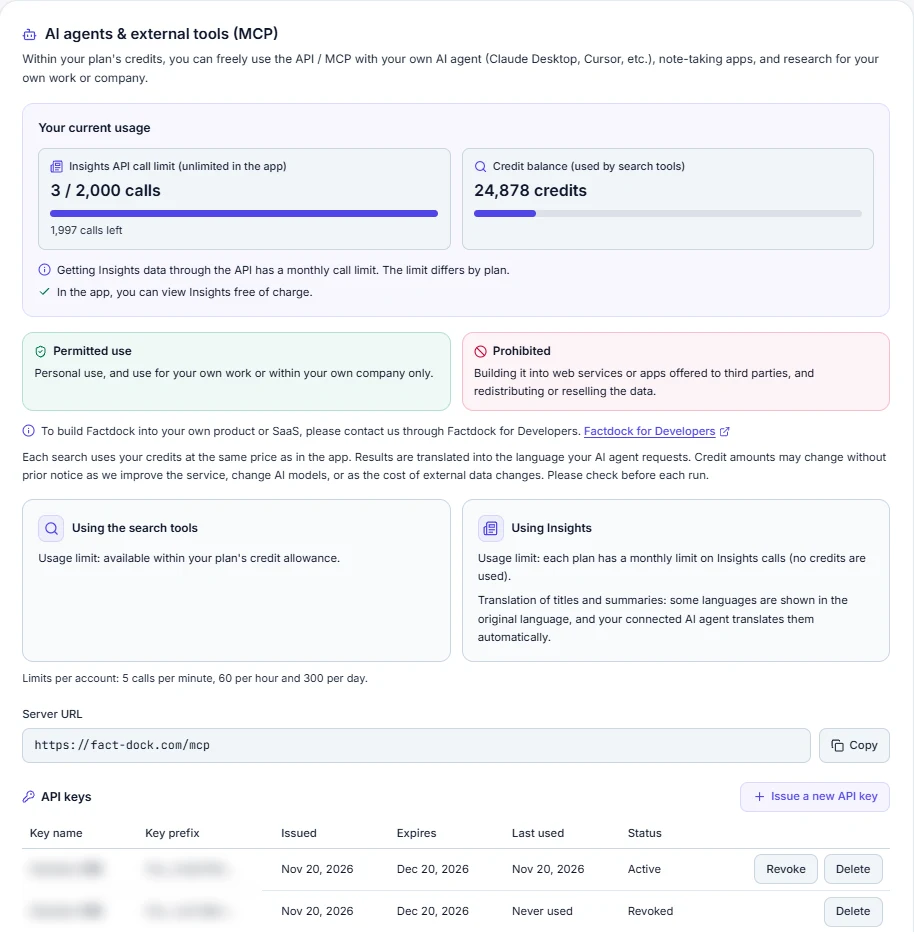
You can also connect with an API key. Keys are issued on Factdock's "API integrations" page, with a name and an expiry date of your choice.
2. Ask in the conversation
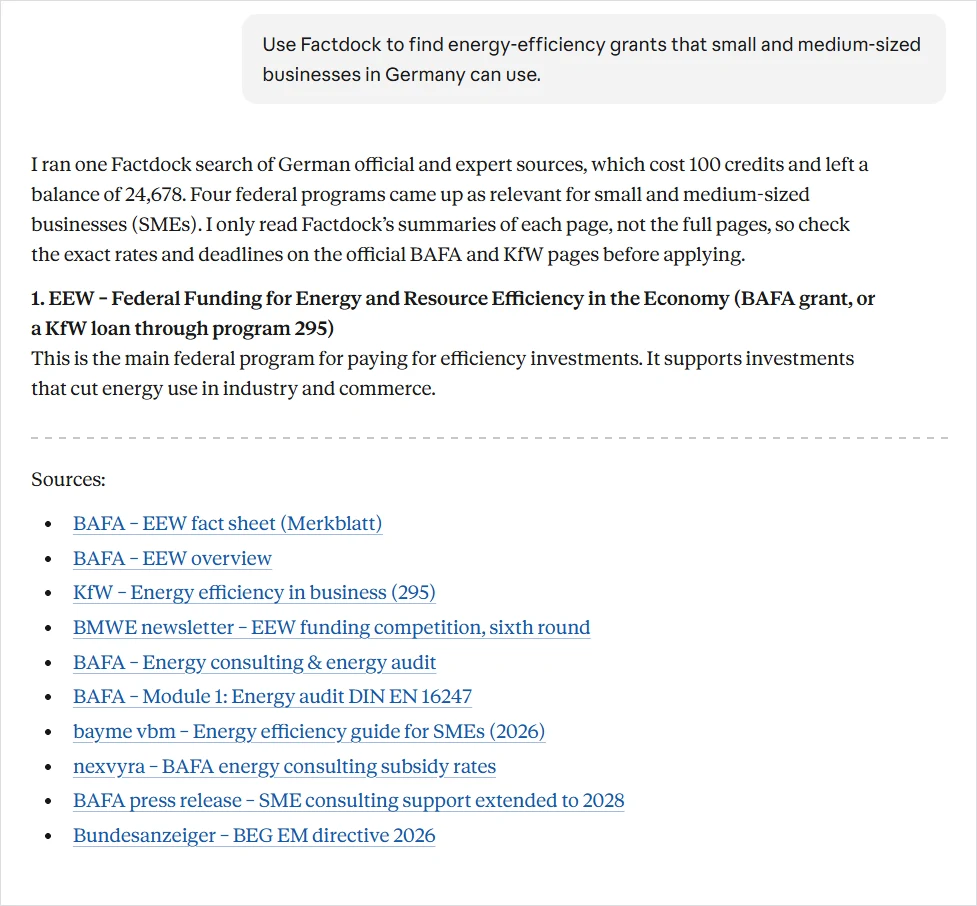
Talk as you normally do and say "search with Factdock." For example: "Search with Factdock for energy-saving subsidies that small German companies can use."
3. It confirms the country and language before searching
Factdock searches information from the country you choose, in that country's language. So your AI assistant first checks with you, for example: "Shall I search German official information in German?" It never assumes and searches the wrong country.
4. Receive an answer with sources
Search results come with source URLs. While reading the AI assistant's summary, you can open the original announcement or paper on the spot and check it.
How to connect Factdock to your AI assistant
The connection URL of the Factdock MCP server is https://fact-dock.com/mcp. Here is a quick guide for each app. Screen names may change when the vendors update their apps.
How to connect Factdock to Claude
In Claude, open "Settings → Connectors → Add custom connector" and enter the connection URL. Sign in on the Factdock screen and approve access, and you are connected. No API key is needed. Claude can be connected on the free plan too (the free plan allows one custom connector).
How to connect Factdock to ChatGPT
This works on ChatGPT Plus or higher. Open "Settings → Apps & Connectors → Advanced settings", turn on Developer mode, then choose "Create", enter the connection URL and select "OAuth" for authentication. Approve access on the Factdock screen, and you are connected.
How to connect Factdock to Cursor
Paste the Factdock MCP server settings into the mcp.json that opens from "Cursor Settings → MCP". The exact text to paste is shown as is on the "API integrations" page in Factdock.
How to connect Factdock to Claude Code and VS Code
For Claude Code, run one connection command in the terminal. For VS Code, add the settings to .vscode/mcp.json in your project, and you can use it from GitHub Copilot in agent mode. In both cases, the command or settings are shown on the "API integrations" page.
How to use Factdock in Obsidian
Find "Factdock" in Obsidian's community plugins, install it and set your API key, and you can search while you write notes. You can also save results you found in the app to an Obsidian note with one button.
How to save Factdock results to Notion
Register your Notion integration key and the destination page on the "API integrations" page, and you can save results from the app to a Notion page.
Searches you can use from the conversation
You can use the same 28 kinds of search as in the app, right from the conversation. For example:
- Primary sources on the web — announcements from each country's agencies, regulators and public bodies
- Papers — from each country's academic databases, with sources
- Patents — checking for similar patents already filed
- Company checks — a business partner's registry and official information
- Trade, law and medicines — rules and approvals, from each country's official information
- Insights — new announcements from governments and regulators around the world
From the conversation, you can also turn your results into a document (Word, PDF or Markdown) or a share link.
For how to use the app and how to keep results in your notes, see How to save your research in Notion and Obsidian. For how to think about finding primary sources, see How to find primary sources.
Built-in safeguards for peace of mind
- Protection against overuse — there is a daily credit limit, and repeated identical searches are stopped automatically
- Missed results are not lost — if the connection drops and results don't arrive, they are kept for 10 minutes. Call again and you receive them without extra credits
- Specialized tools need a first confirmation — tools for veterinary and medical information can be used after you confirm once in the app
- Disconnect any time — you can remove a connected AI assistant from Factdock's "API integrations" page
What is shown is a summary of publicly available information. For decisions involving health, law or money, always check the sources and consult a professional.
Who it is for
- People who use an AI assistant every day — when you want evidence-backed information without switching screens
- People researching rules and regulations abroad — when you want to find official announcements in that country's own language
- People in research and development — when you want to check papers and patents as the conversation goes
- People who want to research in their own language — even documents in a foreign language, in your own language
For businesses that want to build this into their own systems or services, we offer a separate business API.
Pricing
Factdock is available from $3. Connecting through MCP uses the credits of your current plan. There is no extra monthly fee. Each search uses the same credits as in the app. Details are on the pricing page.
Conclusion
The ease of an AI assistant and the reliability of primary sources: you don't have to choose. You can research inside your usual conversation and check the evidence as you go.
Next time you think, "What is the source for that answer?", paste the connection URL and connect Factdock.
What it is
Web Intelligence
Your question is rewritten into the local language and professional terminology of the target region, and Factdock's search engine then searches deep across the open web. Primary sources that ordinary search never surfaces are lifted to the top, so you reach them in your own language without meeting the language barrier.
Academic Papers
Searches more than 15 academic databases at once for papers in fields other than medicine, such as economics, engineering, law and the environment. Builds one list without duplicates that you can read in your own language. Medical and veterinary papers can be searched in Medical & veterinary literature.
Factdock in 2 minutes 30 seconds
The video is in English. You can choose subtitles in your language from the player settings.
Frequently asked questions
Which AI assistants can I use it with?
It works with any AI assistant that supports MCP, including Claude, ChatGPT, Cursor, Claude Code and VS Code. For each one, see the section "How to connect Factdock to your AI assistant" in this article.
Do I need an API key?
No. If you paste the connection URL and log in, you don't need an API key. If you prefer to connect with an API key, you can issue one on Factdock's "API integrations" page.
Does it cost anything?
It uses the credits of your current plan. There is no extra monthly fee. Each search uses the same credits as in the app.
Can I use it in English?
Yes. You can get both the conversation and the summary of results in English. It works the same way in 109 languages, including yours.
Can I build it into my company's systems?
A personal connection is meant for your own use and for work inside your own company. To build it into a system or service, please use the business API.
Our own patent-pending search engine
Primary sources, with citations, in your usual conversation.
Just paste the connection URL and log in. Research official information, papers and patents from around the world in your own language, with sources. Available from $3.