
Introduction: "Where did I see that document?"
When you do research, this happens a lot.
- "I can't remember which source that paper came from."
- "I want to use my findings directly in a report."
- "I want to keep documents from other countries in notes, sorted by topic."
- "I want my team to see the same sources."
It is important to keep your findings together with their sources. With the source, you can check the original document later and show others where the facts come from.

Three things that matter when you keep your findings
1. Keep the source link
Do not keep only the title or a summary. Keep a link to the original document too. It is the quickest way to check the content later.
2. Keep the date you searched
Laws and statistics change. If you know when you found the information, it is easier to compare it with newer information later.
3. Keep everything in the place you use every day
If you keep it in the note app you already use, it is easier to find later, along with your other notes and documents.
Save Factdock search results to Notion or Obsidian
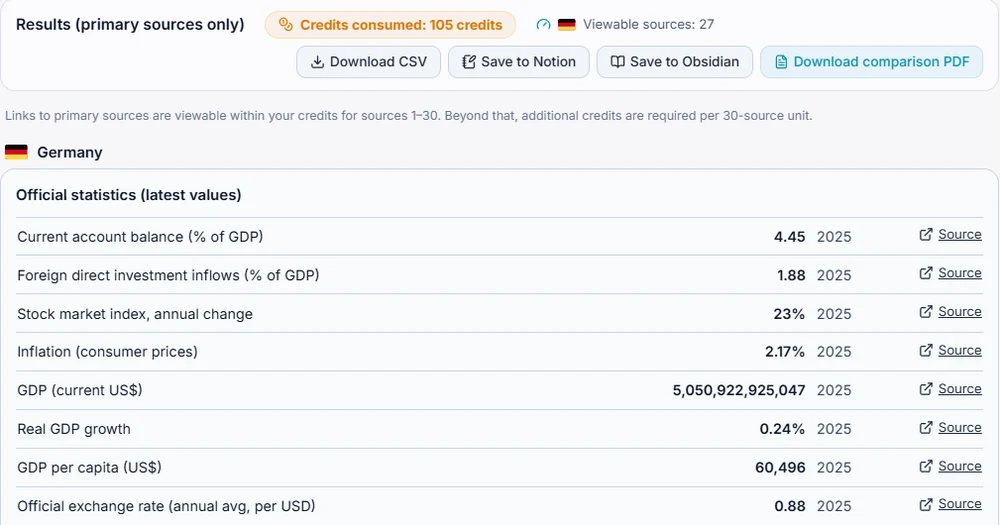
On the Factdock results screen, you will find the "Save to Notion" and "Save to Obsidian" buttons. Just press one. The title, summary and source link of each document you found become a note as they are.
1. Set up where to save, just once
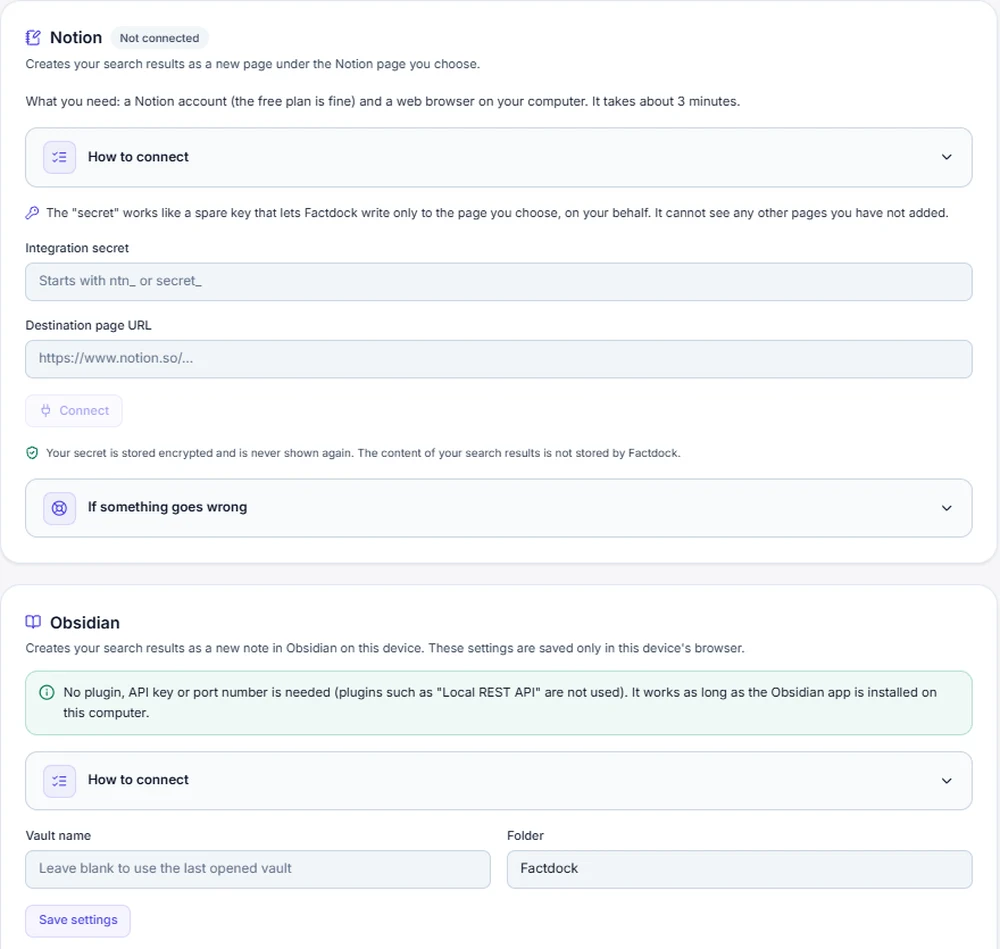
On the "API integrations" screen, you set up where to save, just once. For Notion, you only enter the page to save to and a connection key that you create in Notion. For Obsidian, you only enter the name of your vault and a folder. The screen shows each step in order.
2. Press the button on the results screen
When the search is done, press a save button on the results screen. Results are saved as a table, with their source links. You can also export them as CSV and open them in a spreadsheet app.
3. Saving costs no credits
You can press the save buttons as many times as you like. They cost no credits. When you send results to Notion, they are not stored on Factdock's servers. We simply pass them on to Notion.
You can save paper translations and Insights articles in the same way. If you only want to keep links to documents you are interested in, you can also use Bookmarks.
Bookmarks and Work documents, also inside Factdock
You can keep documents you are interested in with Bookmarks, adding notes and categories. Later, it is easy to find them again by country or field. For details, see our Bookmarks page.
With Work documents, you choose documents from your search results or Bookmarks and put them into a template such as a report, an internal memo or a comparison table. Your document for work is ready right away. You can edit the text on the spot, then print it or export it to PDF, Word, Notion or Obsidian.
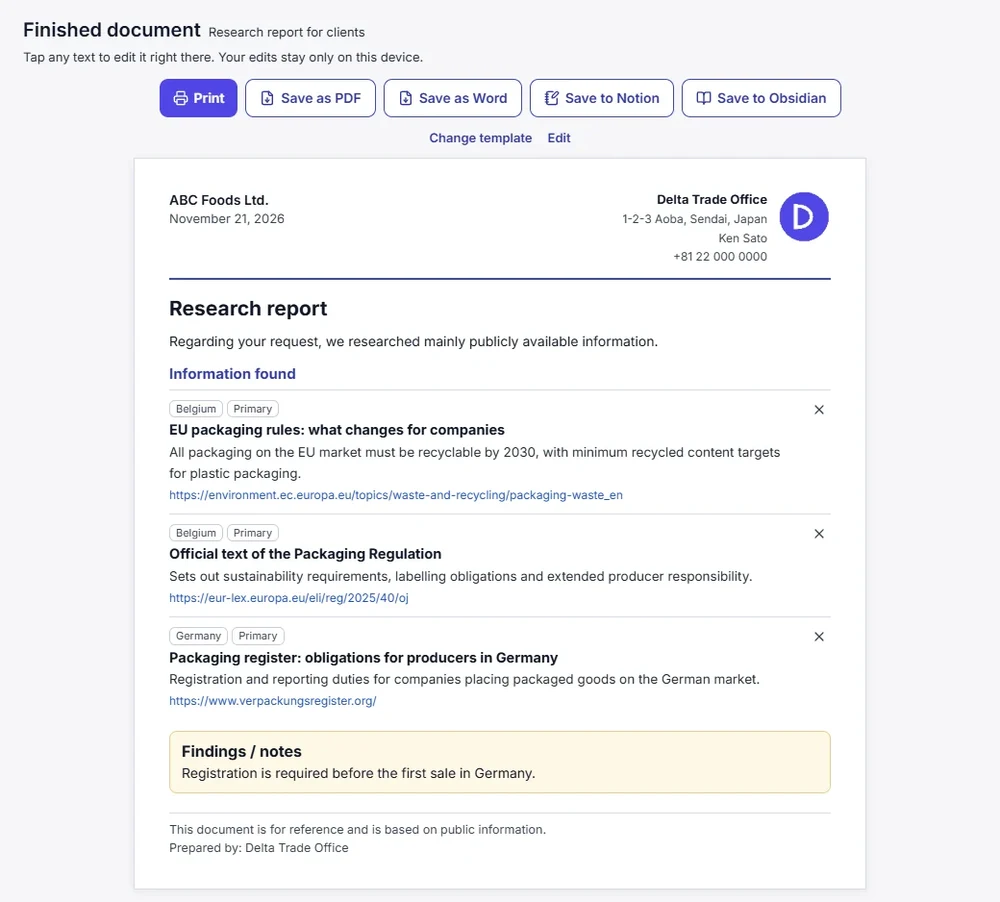
Work documents is free to use. The content of the documents you make is not kept on Factdock's servers. It stays only on your device. For details, see our Work documents page.
Search directly from inside Obsidian
If you use Obsidian, you can also use the Factdock add-on for Obsidian. Without leaving Obsidian, you can search the world's primary sources in your native language and put the results into your notes.
- Search inside Obsidian — Choose your search words and a country, and search the web and papers
- See the price first — The credits needed are shown before you search, and nothing is used until you press the button
- Results go into your notes — The title, summary and source link become a note as they are
To install the add-on, search for "Factdock" in Obsidian's "Community plugins". It works in the desktop (computer) version of Obsidian. To use it, you need a personal API key, which you can issue on a paid plan.
Who this is for
- Researchers and students — When you want to keep papers and public documents by topic, with sources
- Professionals in fields like medicine and law — When you want to keep supporting documents in a form you can look back on
- People who work with other countries — When you want to use information about a country in reports or team documents
- People who want to search in their own words — Type your search and read the results in your native language
Pricing
Saving costs no credits. Search is available from $3. Feel free to try it. You can find full pricing on our pricing page.
Conclusion
Research does not end when you find something. If you keep it with its source, you can check it later and share it with others.
So you never have to ask "Where did I see that document?" again, keep the primary sources you find in your usual notes, with their sources.
What it is
Web Intelligence
Your question is rewritten into the local language and professional terminology of the target region, and Factdock's search engine then searches deep across the open web. Primary sources that ordinary search never surfaces are lifted to the top, so you reach them in your own language without meeting the language barrier.
Academic Papers
Searches more than 15 academic databases at once for papers in fields other than medicine, such as economics, engineering, law and the environment. Builds one list without duplicates that you can read in your own language. Medical and veterinary papers can be searched in Medical & veterinary literature.
Factdock in 2 minutes 30 seconds
The video is in English. You can choose subtitles in your language from the player settings.
Frequently asked questions
Does saving cost credits?
No. Credits are used only for searches and for translations you press yourself. The save buttons are free, no matter how many times you press them.
Are results I save to Notion also kept on Factdock?
No. When you send results to Notion, they only pass through Factdock's servers. We do not store them.
Can I use the Obsidian add-on on a smartphone?
For now, it works in the desktop (computer) version of Obsidian. The "Save to Obsidian" button on the results screen works on any device that has Obsidian installed.
Can I use it in English?
Yes. You can type and read the results in English. Besides English, you can use it the same way in 109 languages, including your native language.
How much does it cost?
Search is available from $3. Saving is free. See our pricing page for full details.
Our own patent-pending search engine
Keep the primary sources you find in your own notes, with sources.
Just search and press a button. Save the title, summary and source link to Notion or Obsidian as they are.